
How to set up Chrome Remote Desktop for iOS

How to set up Chrome Remote Desktop for iOS

Google has released an iOS app that makes it possible to access your Mac or PC from any iOS device with an Internet connection.
Chrome Remote Desktop is hardly a new service from Google. It's been around for years, allowing users to access a Windows or Mac computer from another computer or an Android device. When it came to this Google service, iOS had been left out.
Then on Monday Google unceremoniously released the iOS Chrome Remote Desktop app into the App Store, making it super-easy to access your computer (or a family member's computer) from your mobile device wherever you have a connection.
Before we dive into setting up the iOS app -- or lack of required setup -- you'll need to make sure you have two things installed on the computer you plan on connecting to.
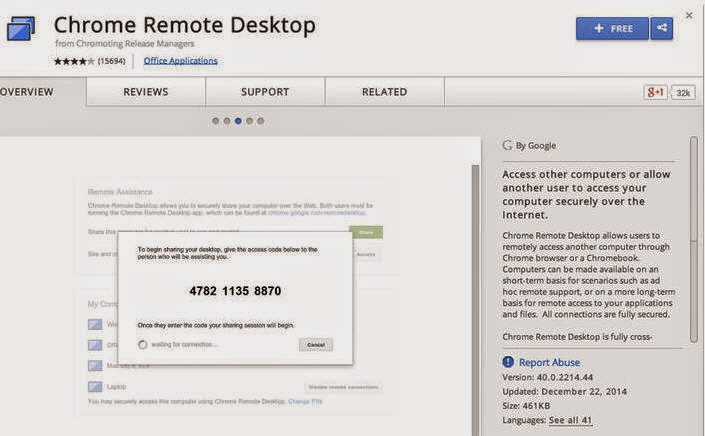
The first is, naturally, Chrome. Second, you'll need to install the desktop version of the Chrome Remote Desktop app from the Chrome Web Store.
Once you have those two items installed, launch the app on your desktop and follow the prompts to complete the setup process. A video walking you through it all can be found here. Trust me when I say, you need very little technical expertise to get it installed.
The most important aspect of setting up the service is to remember your PIN. You did write it down, didn't you? OK, good.
Now that you have a PIN and the app is installed on your computer, download the iOS app from the App Store here. After its installed on your device, sign into the same Google account you used in Chrome and your computer should show up in the list. Tapping on the computer name will launch a remote session, where you'll be prompted to enter your PIN. After successfully entering it, you'll gain complete control over your computer.
So easy it should be illegal.
CNET

Comments

Popular posts from this blog

10 app icon redesigns: The good, the bad and the ugly

10 app icon redesigns: The good, the bad and the ugly Redesigns happen. Whether a certain look has gone out of style, a brand's direction has changed, or it's just time for something fresh, many popular apps have changed the design of their icons. Instagram just changed its app icon, and while a new look was probably a good idea, many aren't happy about it.   nstagram is far from the first app to go through this. Sometimes it's a home run, but it's rare. More often a changed icon either takes a while to get used to or is just plain bad. Occasionally, the redesign lives in infamy.  May notable icon redesigns came after after Apple transitioned from iOS 6 to iOS 7, introducing a new design philosophy that departed from the skeuomorphism (think: leather texture and wood trim) of the past and embracing a more flat, simple aesthetic. Apps like Messages, Phone, Mail and Weather dropped the gloss in favor of minimalism, and plenty of third-party ap...

GE GAS18PSJSS Top Freezer Refrigerator with Autofill Pitcher review:

 GE GAS18PSJSS Top Freezer Refrigerator with Autofill Pitcher review:  Get automatic water pitcher fill-ups from this top-freezer fridge The Good The Autofill Pitcher is a unique feature that works well and seems practical for daily use -- a rarity with top freezers. Despite the plain-looking design, the fridge feels sturdy and well-constructed. The Bad Storage space is cramped to begin with, let alone with the Autofill Pitcher taking up space on the top shelf. Cooling performance was also pretty unexceptional. The Bottom Line The Autofill Pitcher is a borderline ingenious fridge feature, but the GAS18PSJSS isn't well-rounded enough to be a top pick. for price and more click here

The Future Of Work: Why Innovation Is Every Employee’s Job

 The Future Of Work: Why Innovation Is Every Employee’s Job  PSFK Labs sits down with management at Johnson & Johnson to learn how the company comes up with their next ‘big idea’ Where do a company’s best ideas come from? Even in the most progressive organizations, groundbreaking change is expected from research and development teams, internal incubators or its high-level executives—overlooking untapped potential on other teams to provide and collaborate on ideas. In the Future of Work by PSFK Labs , Steve Garguilo, leader of Creative Engagement at Johnson & Johnson , shares how the company creates an environment and culture that encourages every department to be a part of initiating the next big company change. Read More: Click here